
Read permissions
Products and inventory at install; languages, markets, publications, and the public catalog if you turn on those features.
Shopify search app · control from your dashboard
Choose which products and collections to show, and improve search across multiple languages.
With the advanced engine, control recommendations and results, adapt filters, and review the automatic analysis by language. Activated per store through support.
Available on the Shopify App Store. Choose from four plans with a seven-day trial; Shopify shows you the price and the date of the first charge before you accept.
5 products available · showing 4
Products, prices, and stock are examples. The simulation illustrates the matching criteria; in your store, the button adds the variant to the Shopify cart.
Advanced engine
Choose specific products or collections to show when search opens and as alternatives when there are no results.
Show a collection first or limit a search to selected collections. Exclude products or collections from search and its recommendations.
Sizes for clothing, weights and measurements where relevant. Combines contextual filters, synonyms, and typo tolerance.
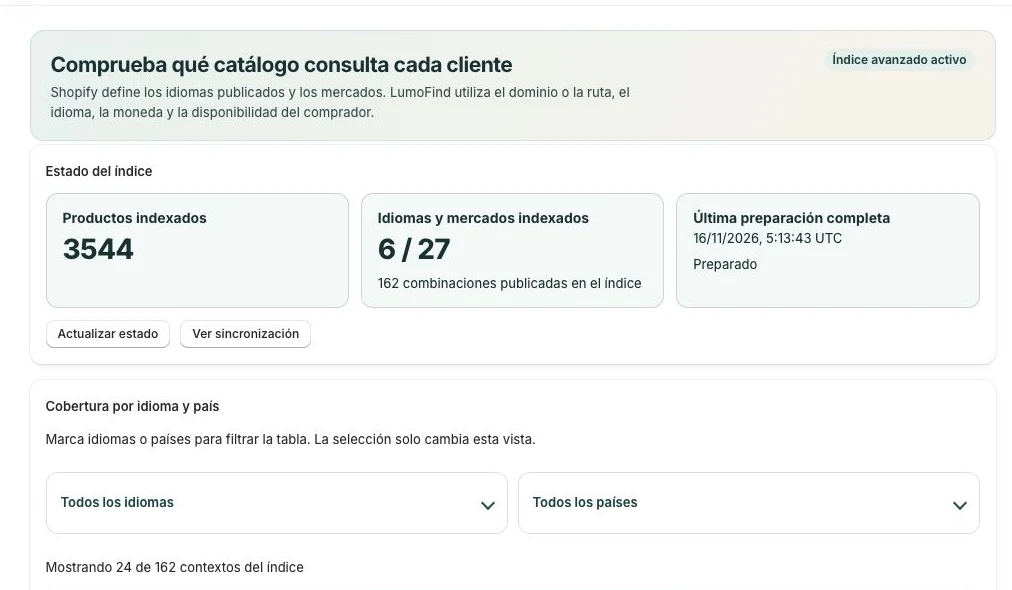
Results as the shopper types, with the language, market, currency, and availability published in Shopify. Catalog syncing runs in the background.
Learning refreshes its usage analysis for each language. Review, test, and activate its suggestions before they reach your customers.
Shopping journey
The product page and cart stay in Shopify. The advanced index extends the search fields and controls.
From the third letter, without pressing Enter. If the shopper keeps typing, the previous response is canceled so results don’t get mixed up.
We search the title, description, brand, type, published collections, options, SKU, and barcode. Out-of-stock products are left out of regular search.
Image, brand, variant, price, and strikethrough compare-at price when Shopify provides a valid comparison.
Choose a quantity and add to cart from the result. If Shopify rejects the quantity because of stock, a notice appears and what was added is checked.
What you manage
The advanced dashboard is enabled per store inside Shopify. Prepare changes, check their effect, and publish them when you’re satisfied.
The AI assistant is configured separately and is subject to its own usage limits. The product list works without waiting for its answer. Get to know each section of the dashboard.
Explainable relevance
With the advanced engine, you can check how much the code, name, or collection weighs in real queries.
The simulation above uses a fictional catalog and simplified criteria. With the advanced engine, search adds typo and measurement tolerance and the store’s own rules. How we handle queries that come up empty.
Installation
Three steps and a clear way back. No migrations and no editing theme files.
Installation requests read access to products and inventory. Language and market features also request read access to languages, markets, publications, and the public catalog. We don’t request orders, customers, or payments.
The dashboard shows the progress. The time depends on catalog size; we don’t promise minutes.
From the theme editor: color, button selector if needed, save. Turning it off restores native search.
Rollback. Turn off the app embed and your theme searches as before. When you uninstall, your store’s index, sessions, and settings are deleted.
Trust
What we say here is in the app’s code and our privacy policy, not in a brochure.
Read the privacy policyProducts and inventory at install; languages, markets, publications, and the public catalog if you turn on those features.
Index, sessions, and settings kept separate for each installation.
A signed 30-minute identifier counts usage; we don’t store what each person types.
Get answers about installation and how it works by email.
Monthly prices in USD. Shopify shows the subscription amount, local currency conversion where applicable, and any applicable taxes.
$49 / month
10,000 search sessions a month
5,000 products
7 trial days for new subscriptions
$79 / month
30,000 search sessions a month
10,000 products
7 trial days for new subscriptions
$150 / month
100,000 search sessions a month
25,000 products
7 trial days for new subscriptions
$299 / month
250,000 search sessions a month
50,000 products
7 trial days for new subscriptions
Search from three characters on the main published catalog, available products, compare-at price on sale items, and a quantity selector. Turned on in the theme editor.
Contextual and out-of-stock filters, typo and measurement correction, design, rules, synonyms, Learning, recommendations, analytics, reports, and an index by language and market. Ask support about activation.
Answers questions and can review catalog photos if enabled. A search subscription doesn’t activate the assistant or include unlimited use.
A session starts when a visitor searches with at least three characters and lasts 30 minutes. Keystrokes are grouped into the same session. Search stays available when you reach the monthly figure, with no automatic surcharge. If your catalog exceeds the limit, you need to upgrade your plan before publishing a new index.
Frequently asked questions
Shopify sends a webhook and LumoFind rereads the catalog in the background. Meanwhile, the last complete version of the index keeps serving results; you don’t have to rebuild anything by hand.
Regular search shows available products. With the advanced engine, you can enable a separate “Out of stock only” option in the filters for shoppers who want to view a product page; those cards can’t be purchased.
With the advanced index, LumoFind follows the language and market published in Shopify for the shopper’s domain. Translations, prices, and availability must exist in Shopify for that context; the app doesn’t translate your catalog on its own.
With the advanced engine, search tolerates many typos and measurements written without a space. You can review and publish per-language synonyms and rules from the dashboard; Learning suggests changes but doesn’t activate them without your approval.
No. It’s turned on as an app embed from the theme editor: you choose the accent and text colors and, if your theme uses its own search button, you can specify its selector. If you turn it off, the theme’s native search works again.
Search isn’t cut off and no automatic charges are made. The dashboard shows the limit, and you can change plans in Shopify. If your catalog exceeds your plan’s product limit, the dashboard warns you and doesn’t publish an incomplete index: the index already published keeps working until you upgrade.
All four plans include search and cart for the main catalog. What changes are the product and session limits. The advanced engine is enabled per store; ask support about availability. The assistant is enabled separately and has its own limits.
The app doesn’t request shopper accounts or contact details. It uses the catalog and anonymous search sessions; analytics requires consent. It doesn’t keep a query history tied to individuals. See the privacy policy for retention details.
LumoFind for Shopify
Install it from the Shopify App Store and choose a plan with a seven-day trial.