Choose which products and collections to show, and improve search across multiple languages.
With the advanced engine, control recommendations and results, adapt filters, and review the automatic analysis by language. Activated per store through support.
Available on the Shopify App Store. Choose from four plans with a seven-day trial; Shopify shows you the price and the date of the first charge before you accept.
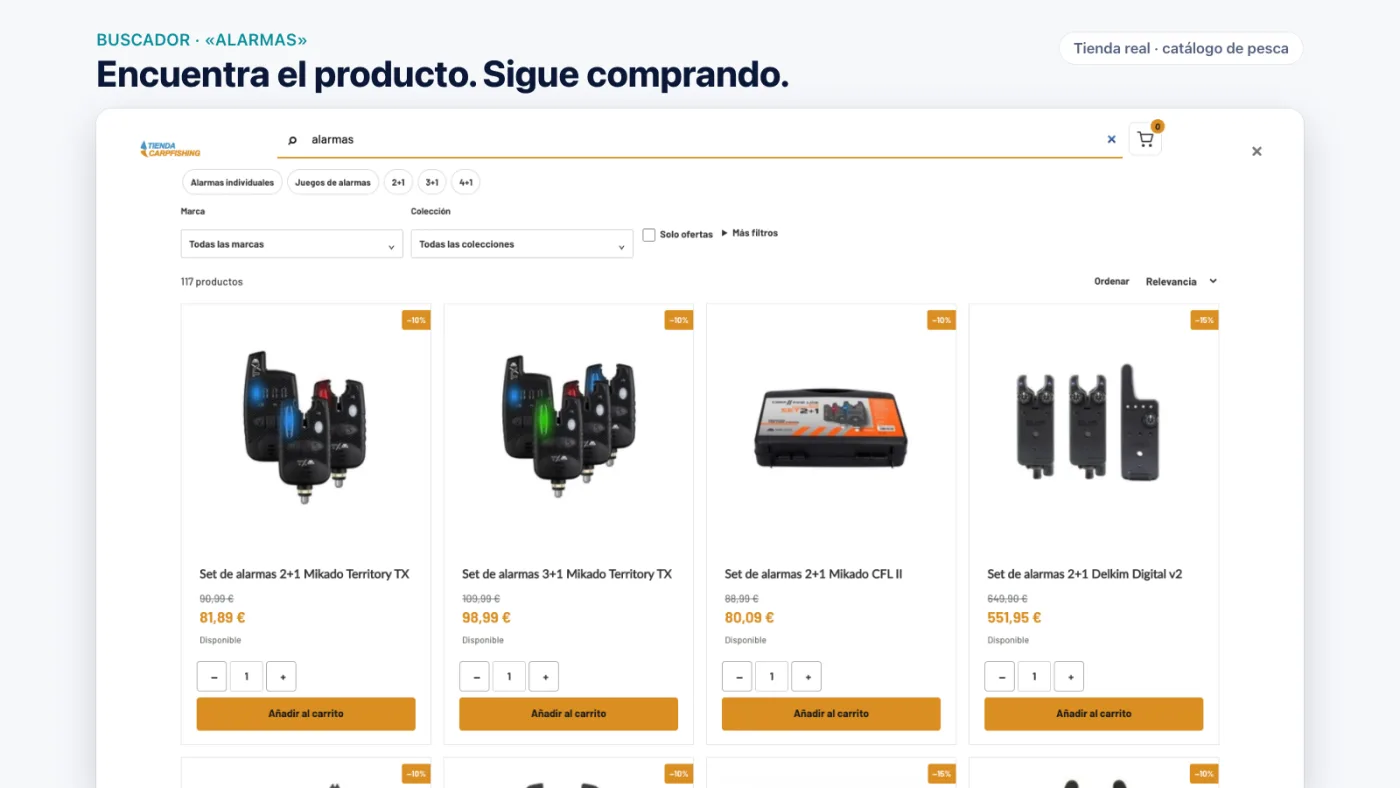
Carpfishing store with the advanced engine enabled.
Search
Type the way your customers type.
See examples from two real stores. Language, market, and assistant options depend on each merchant’s settings and published data.
Advanced engine This walkthrough shows a store with the advanced engine enabled.
From the third letter, no Enter needed
Title, description, brand, type, published collections, options, SKU, and barcode. If the shopper keeps typing, the previous response is canceled.
Advanced engine
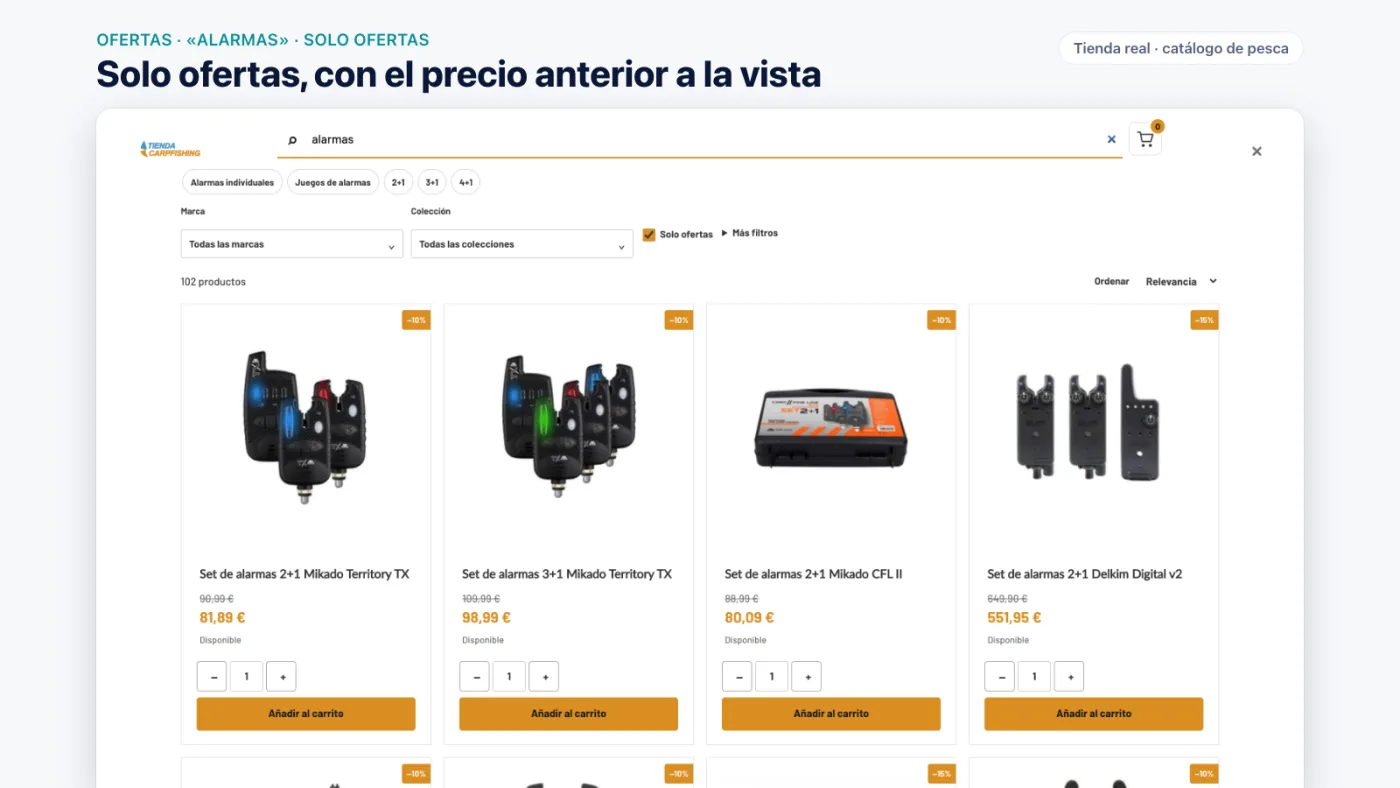
In stock first
Regular search hides out-of-stock products. The store can enable a separate “Out of stock only” query. Sale items show the compare-at price when Shopify provides a valid comparison.
Advanced engine
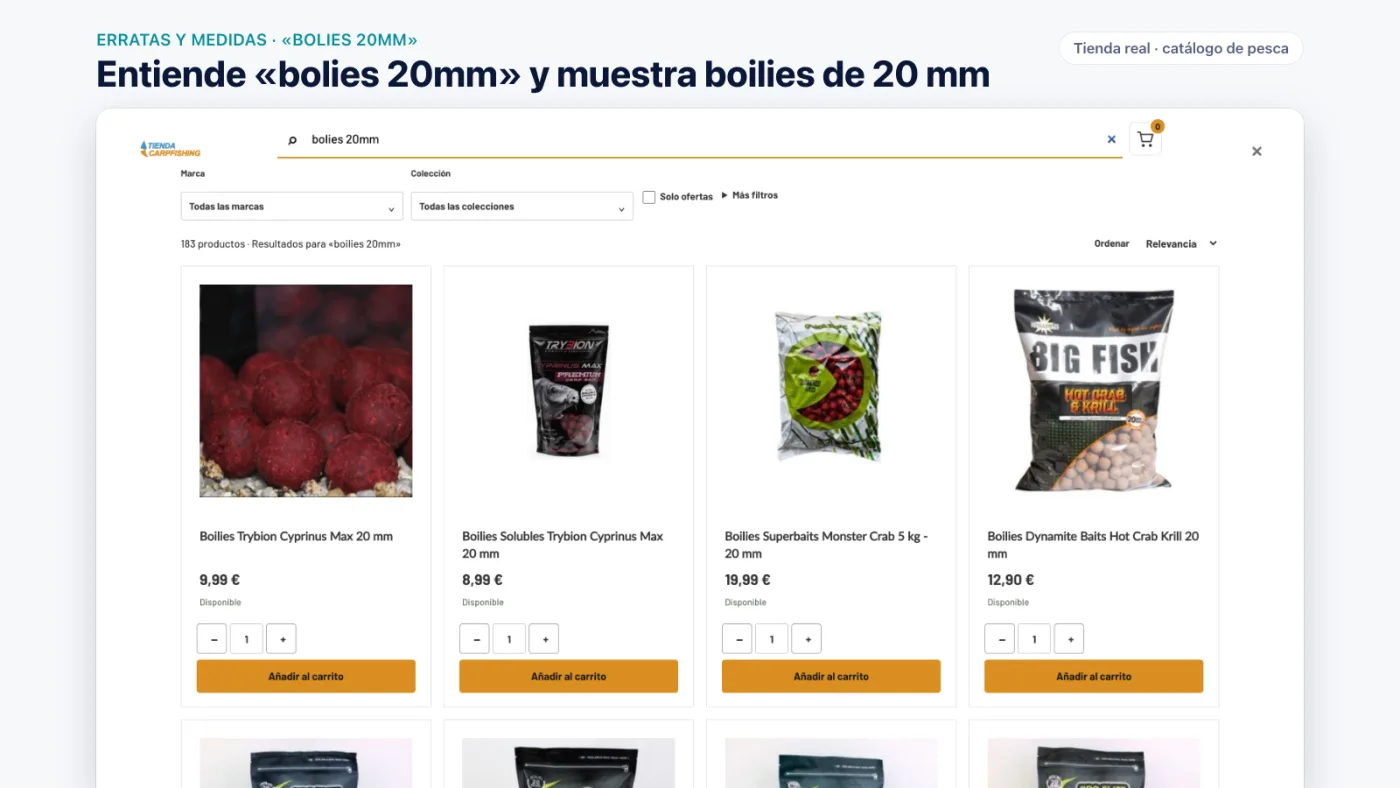
Typos and measurements
“bolies 20mm” can find 20 mm boilies; valid brands and codes are protected from indiscriminate corrections.
Advanced engine
Product before accessory
“rod” prioritizes rods over rod sleeves; you can define specific rules for your catalog.
Advanced engine
A real example
Real example from tiendacarpfishing.es. Typo tolerance combines the typed term with the catalog context; not every word is corrected the same way.
Filters and purchase
Refine, choose, and add without leaving search.
Quantity and add to cart
Right from the card. If Shopify rejects the quantity because of stock, a notice appears and what was added is checked. Payment stays in Shopify.
Advanced engine
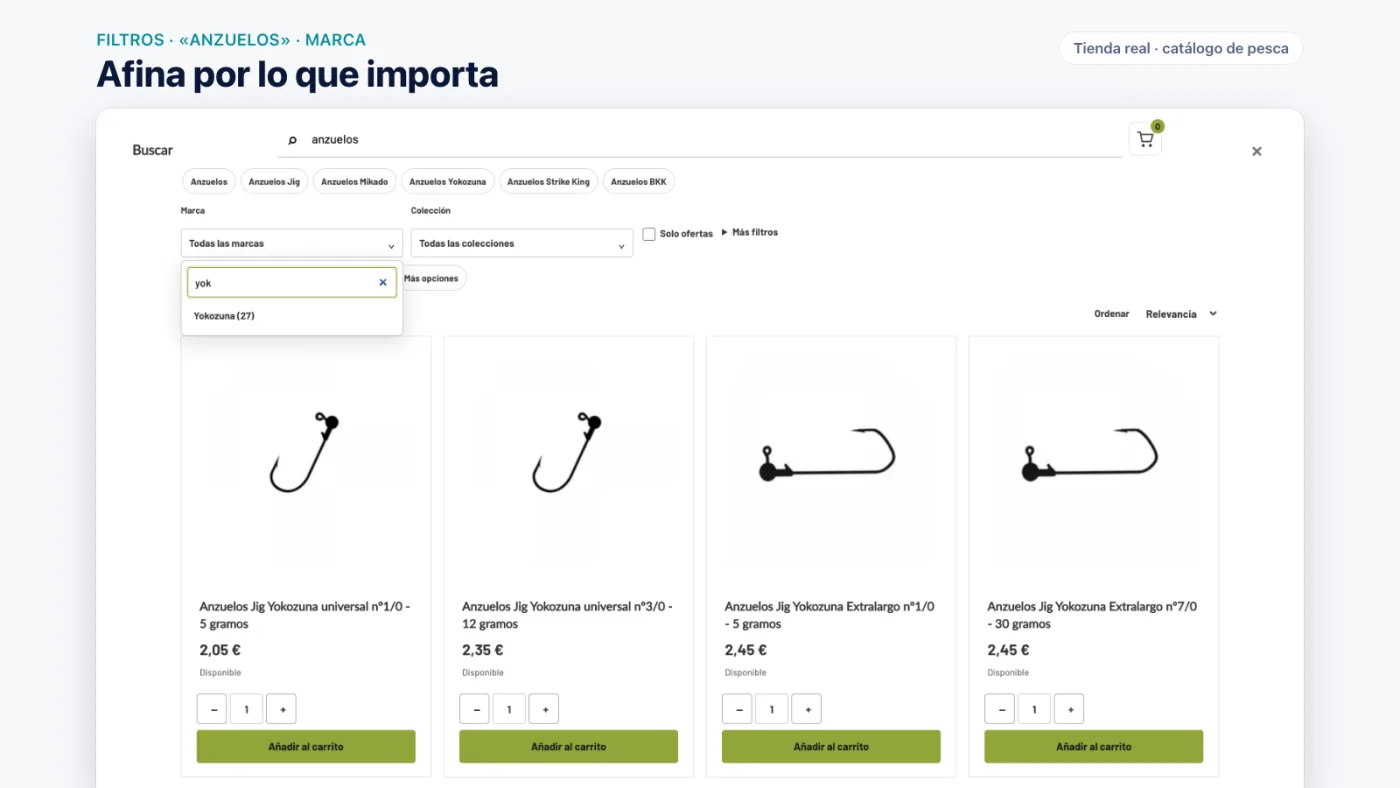
Searchable brands and collections
Type inside the filter to find a brand or collection. Price, sale items, sizes, and variant options adjust to the query.
Advanced engine
Go back without losing anything
Open a product page, tap Back, and get your query, filters, and scroll position back.
tiendabass.es: brand filter with its own search box inside the dropdown.
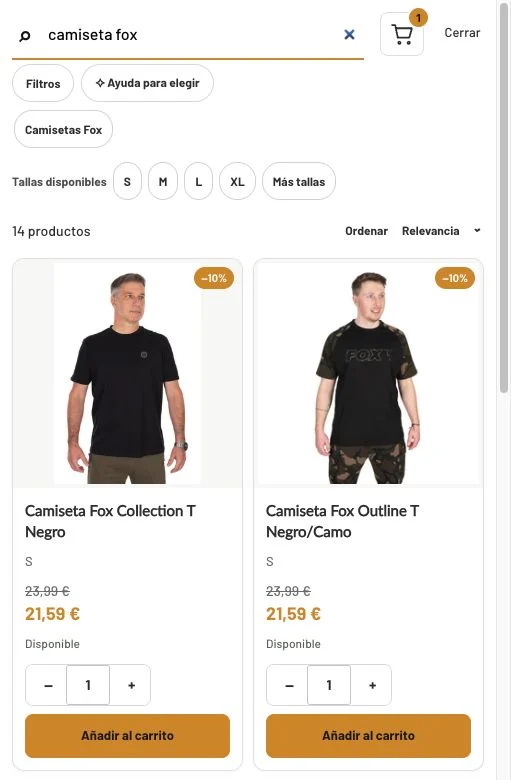
On mobile: available sizes, compare-at price, quantity, and cart on the same card.With “On sale only” active, every result shows its discount badge.
Recommendations
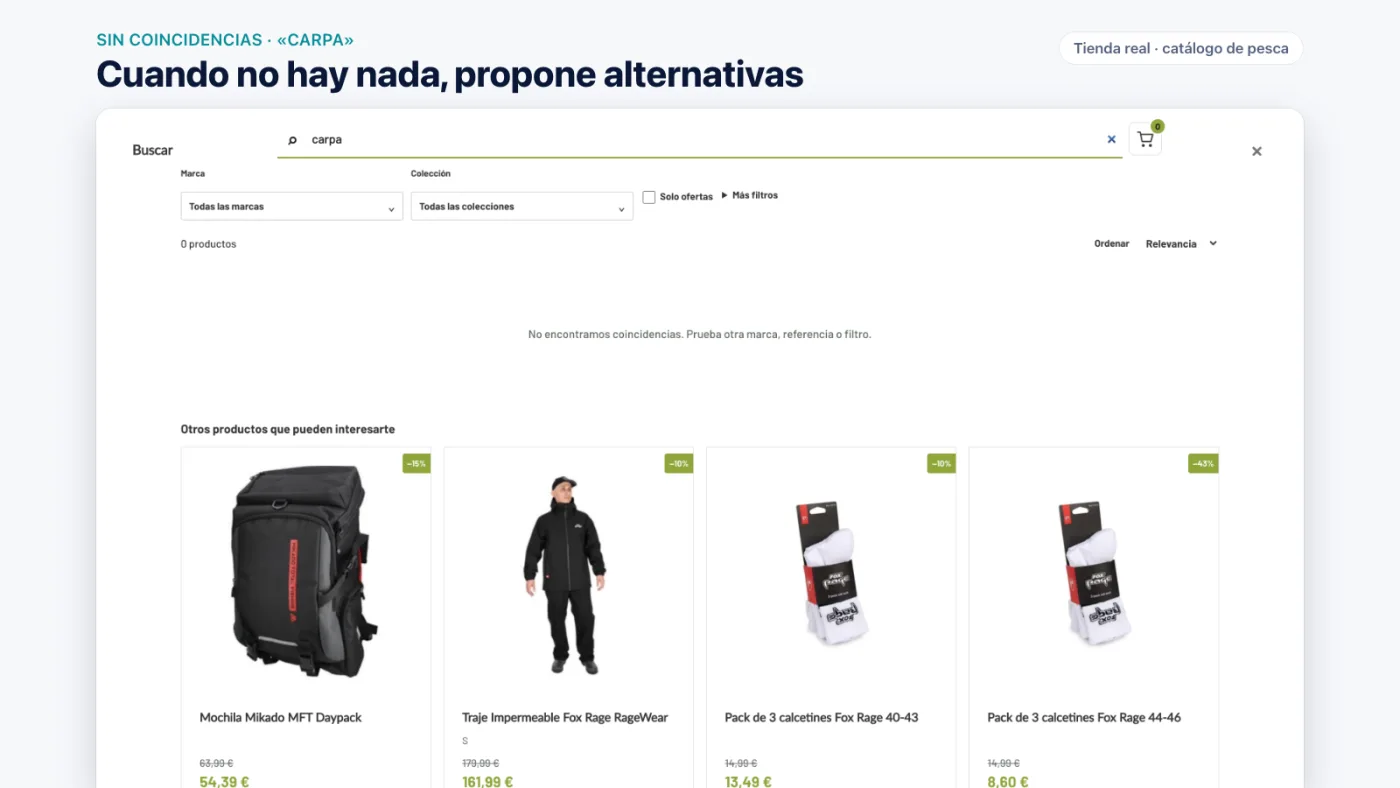
When nothing matches, the screen isn’t empty.
Advanced engine
Choose specific products or collections to show when search opens and as alternatives when there are no results.
Show a collection first or limit a search to selected collections. Exclude products or collections from search and its recommendations.
What you manage
A dashboard inside Shopify, section by section.
Overview, Design, Search rules, Synonyms, Learning, Recommendations, and Maintenance are inside Shopify. The screenshots show the dashboard with the advanced engine enabled.
Advanced engine
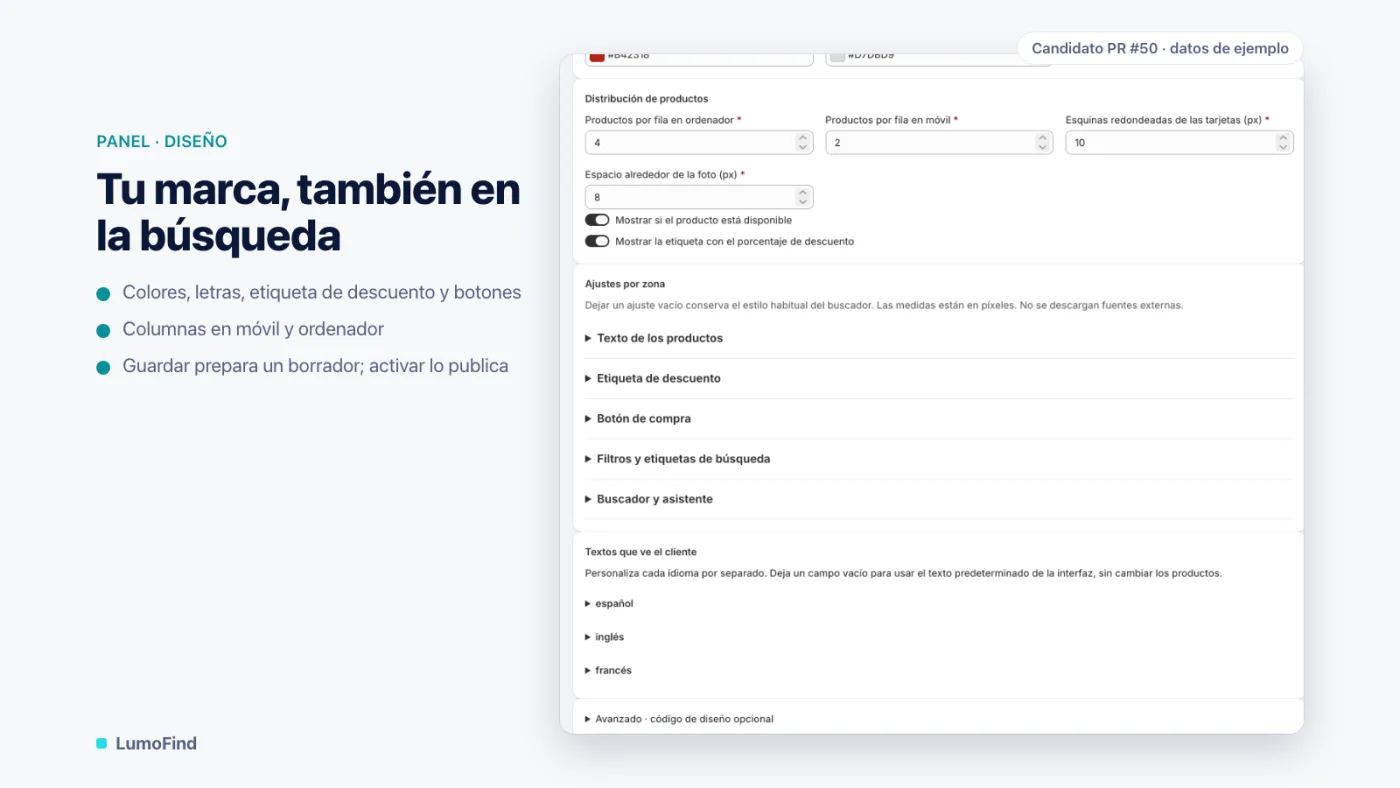
Design
Colors, fonts, discount badge, buttons, and columns. Saving prepares a draft; activating publishes it.
Advanced engine
Rules and synonyms
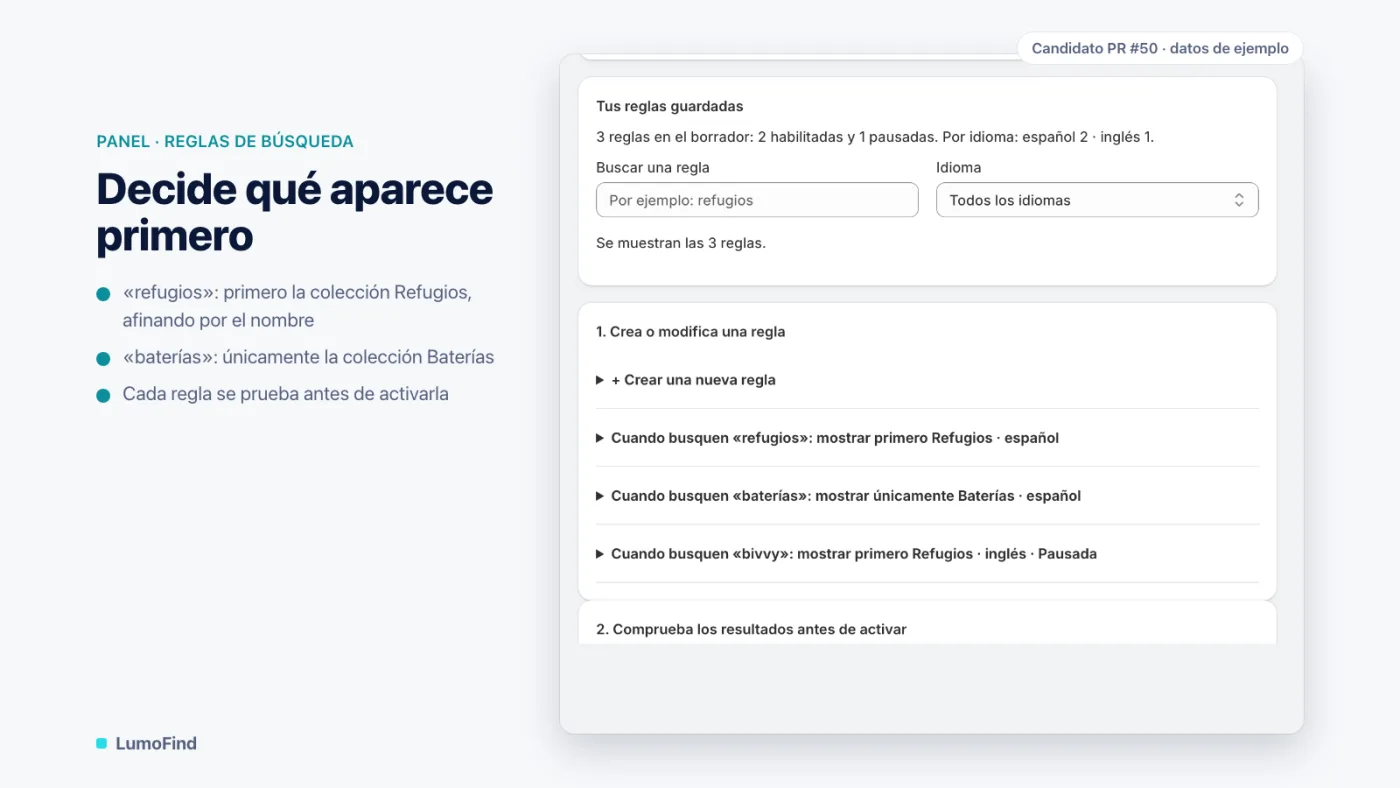
“bivvies”: the Bivvies collection first. “batteries”: Batteries only. Per-language synonyms. Each rule is tested before it’s activated.
Advanced engine
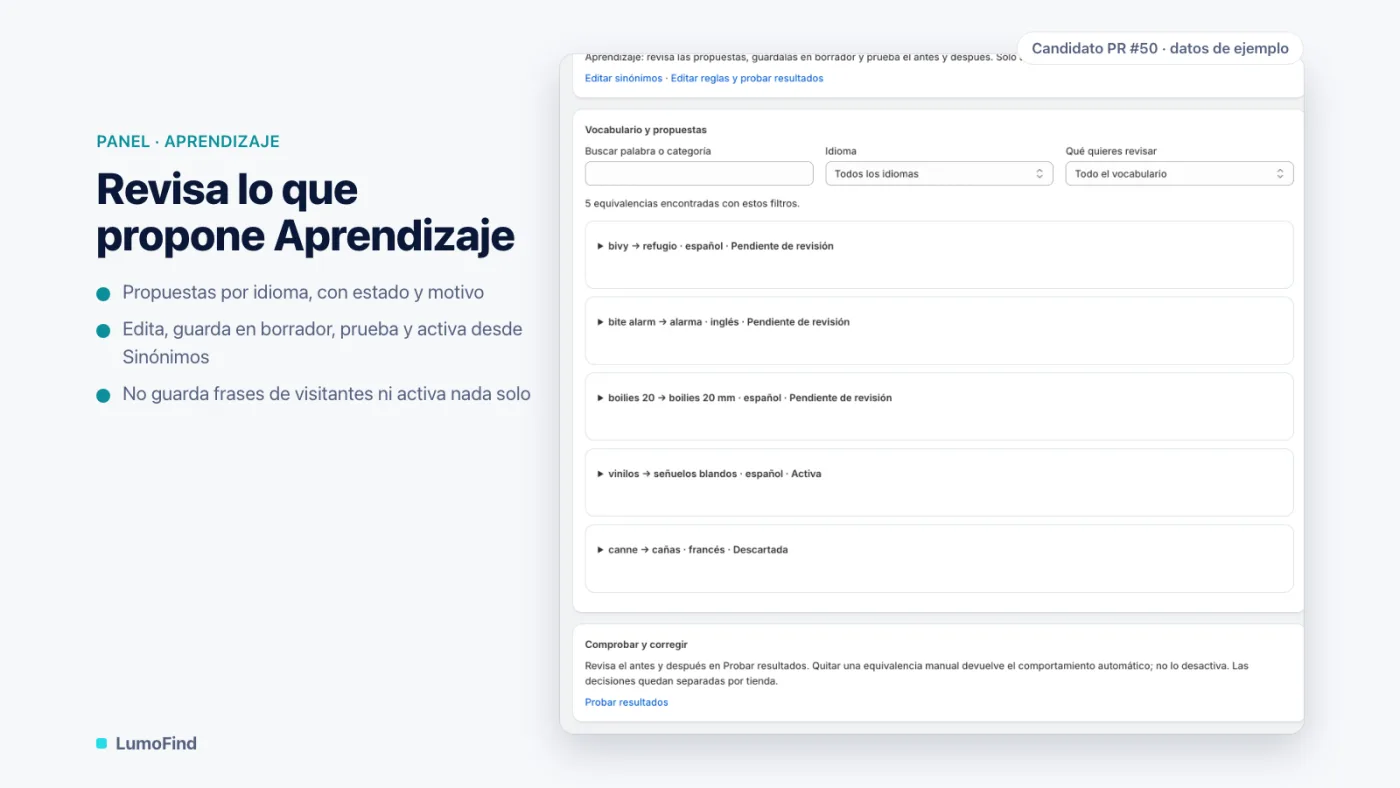
Learning
Learning refreshes its usage analysis for each language. Review, test, and activate its suggestions before they reach your customers.
Advanced engine
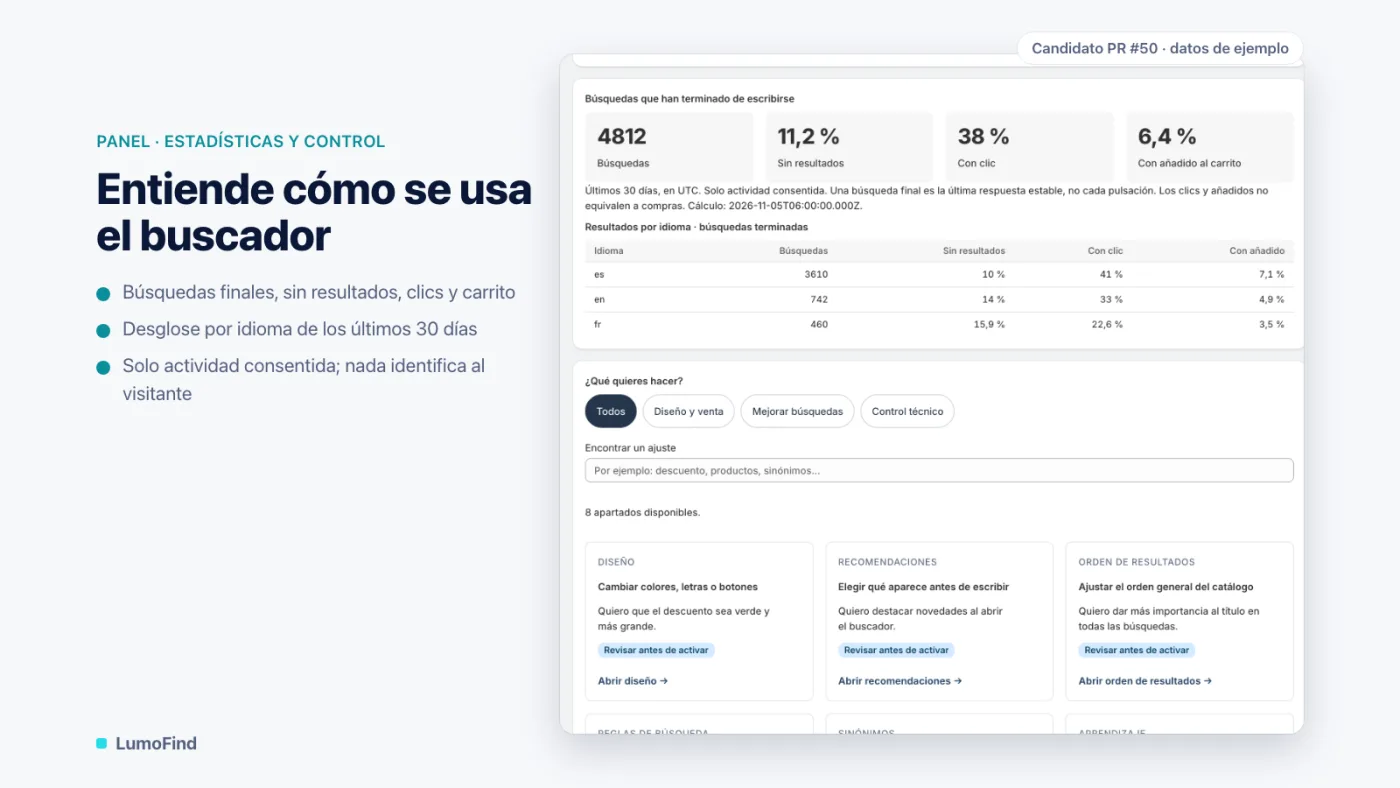
Statistics
Completed searches, zero-result searches, clicks, and cart by language, only with consent. Clicks and carts aren’t purchases.
Explainable relevance
A ranking you can check against your catalog.
Each result ranks higher for a specific reason, in this order. Try it in the simulation with “204100,” “fox,” or “rod.”
Advanced engine
Code, title, collection
Identical SKU or EAN first; then exact title and published collection.
Advanced engine
Start of title, type, and brand
“rod” shows rods before a rod sleeve; then exact type and brand.
Advanced engine
Rest of the text
Title, options, and description containing the words; then configured corrections and rules are applied.
Products, prices, and stock are examples. The simulation illustrates the matching criteria; in your store, the button adds the variant to the Shopify cart.
Languages and markets
Your store sets the context.
Primary context
If you sell in a single language and country, search follows the catalog and prices Shopify publishes for them.
Advanced engine
Multiple languages and countries
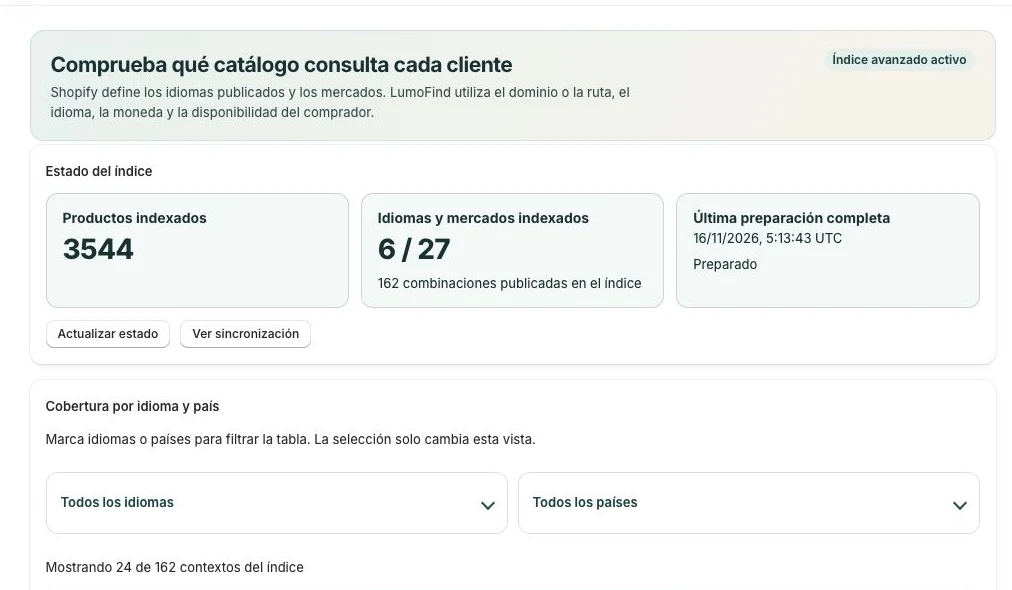
The domain or path sets the language and market; prices and availability by variant and country. Only in the contexts Shopify has published; it’s not a translation service.
Bass dashboard with the advanced index enabled.
Check in the dashboard which combinations are indexed, and filter the table by language or country.
AI and images
An optional assistant that answers using your catalog.
Advanced engine
Natural-language questions, recommendations, and image review when available and enabled by the merchant. Its budget is separate from text search, which keeps working even if the assistant is turned off.
Installation
Install. Sync. Activate.
Three steps and a clear way back. No migrations and no editing theme files.
1
Install the app
Installation requests read access to products and inventory. Language and market features also request read access to languages, markets, publications, and the public catalog. We don’t request orders, customers, or payments.
2
Wait for the catalog to be ready
The dashboard shows the progress. The time depends on catalog size; we don’t promise minutes.
3
Turn on the app embed
From the theme editor: color, button selector if needed, save. Turning it off restores native search.
Rollback. Turn off the app embed and your theme searches as before. When you uninstall, your store’s index, sessions, and settings are deleted.
Desktop Mobile Keyboard and screen reader
Four plans based on your catalog and usage
Monthly prices in USD. Shopify shows the subscription amount, local currency conversion where applicable, and any applicable taxes.
Launch
$49 / month
10,000 search sessions a month
5,000 products
Advanced engine: enabled per store
Advanced: products and collections
Advanced: filters, rules, and languages
Advanced: design, Learning, and analytics
Variants, sale prices, and cart
Optional AI with its own limits
7 trial days for new subscriptions
Growth
$79 / month
30,000 search sessions a month
10,000 products
Everything in Launch
7 trial days for new subscriptions
Pro
$150 / month
100,000 search sessions a month
25,000 products
Everything in Growth
7 trial days for new subscriptions
Scale
$299 / month
250,000 search sessions a month
50,000 products
Everything in Pro
7 trial days for new subscriptions
Features and activation requirements
Search and cart
Included in all four plans
Search from three characters on the main published catalog, available products, compare-at price on sale items, and a quantity selector. Turned on in the theme editor.
Advanced engine and dashboard
Enabled per store
Contextual and out-of-stock filters, typo and measurement correction, design, rules, synonyms, Learning, recommendations, analytics, reports, and an index by language and market. Ask support about activation.
AI shopping assistant
Optional · separate activation and limits
Answers questions and can review catalog photos if enabled. A search subscription doesn’t activate the assistant or include unlimited use.
A session starts when a visitor searches with at least three characters and lasts 30 minutes. Keystrokes are grouped into the same session. Search stays available when you reach the monthly figure, with no automatic surcharge. If your catalog exceeds the limit, you need to upgrade your plan before publishing a new index.
Shopify sends a webhook and LumoFind rereads the catalog in the background. Meanwhile, the last complete version of the index keeps serving results; you don’t have to rebuild anything by hand.
Do out-of-stock products show up?
Regular search shows available products. With the advanced engine, you can enable a separate “Out of stock only” option in the filters for shoppers who want to view a product page; those cards can’t be purchased.
Does it work with multiple languages or currencies?
With the advanced index, LumoFind follows the language and market published in Shopify for the shopper’s domain. Translations, prices, and availability must exist in Shopify for that context; the app doesn’t translate your catalog on its own.
Does it correct typos or understand synonyms?
With the advanced engine, search tolerates many typos and measurements written without a space. You can review and publish per-language synonyms and rules from the dashboard; Learning suggests changes but doesn’t activate them without your approval.
Do I have to edit my theme?
No. It’s turned on as an app embed from the theme editor: you choose the accent and text colors and, if your theme uses its own search button, you can specify its selector. If you turn it off, the theme’s native search works again.
What happens if I exceed my plan’s sessions?
Search isn’t cut off and no automatic charges are made. The dashboard shows the limit, and you can change plans in Shopify. If your catalog exceeds your plan’s product limit, the dashboard warns you and doesn’t publish an incomplete index: the index already published keeps working until you upgrade.
What’s the difference between Launch, Growth, Pro, and Scale?
All four plans include search and cart for the main catalog. What changes are the product and session limits. The advanced engine is enabled per store; ask support about availability. The assistant is enabled separately and has its own limits.
What customer data does it use?
The app doesn’t request shopper accounts or contact details. It uses the catalog and anonymous search sessions; analytics requires consent. It doesn’t keep a query history tied to individuals. See the privacy policy for retention details.
LumoFind for Shopify
Make searching feel more like shopping.
Install it from the Shopify App Store and choose a plan with a seven-day trial.